

Home automation used to mean expensive systems installed by professionals. Today, you can build a functional smart home for less than the cost of a decent dinner out.
The shift happened because competition got fierce. Companies like TP-Link, Wyze, and Amazon flooded the market with reliable, affordable gadgets. They prove that “cheap” doesn’t mean “broken.”
But there’s a catch: not all affordable home automation gadgets work together. Buy the wrong ones, and you’ll end up with devices that don’t talk to each other. This guide cuts through the noise and shows you exactly which gadgets integrate seamlessly—and which ones to avoid.
Whether you’re a renter testing the waters or a homeowner on a budget, you’ll find real, practical recommendations here.
What Counts as “Affordable” Home Automation?
Before we get into specific gadgets, let’s define what affordable actually means in 2026.
Affordable home automation is any smart device or system that:
- Costs under $100 per gadget (ideally $10–$50)
- Requires no professional installation
- Works with existing WiFi or low-cost connectivity (Zigbee, Z-Wave)
- Integrates with at least one major ecosystem (Amazon Alexa, Google Home, Apple HomeKit)
The key difference between affordable and expensive systems? Enterprise setups require a hub, professional wiring, and ongoing subscriptions. Affordable gadgets work standalone or with a budget-friendly hub (often $25–$50).
Avoiding Hidden Costs
Here’s where people mess up: they buy cheap gadgets, then get hit with subscription fees.
A $15 smart camera sounds great until you realize cloud storage costs $5/month. A $30 smart lock sounds affordable until the app requires a $10/month subscription to unlock remotely.
Always check: Does the gadget work offline? Does it require paid cloud storage? Can you use basic features without a subscription?
The best affordable gadgets work without subscriptions for core features. (Advanced features like AI detection or extended cloud history? Those might cost extra—but they’re optional.)
Why Cheap ≠ Bad
Expensive brands aren’t always better. A $200 smart thermostat and a $50 one might both lower your heating bill. The difference is in learning curves and extra features you might not need.
Affordable gadgets from established brands (TP-Link, Wyze, Tapo, Amazon) have solid build quality, regular software updates, and decent customer support. They’ve been tested by millions of users.
The real question: Does it solve your problem? If yes, the price difference usually isn’t worth it.
8 Best Affordable Home Automation Gadgets (Ranked)
1. TP-Link Kasa Smart Plug (KP115) – Best Overall Value
Price: $15–$20 | Connectivity: WiFi | Integration: Alexa, Google Home, Apple HomeKit
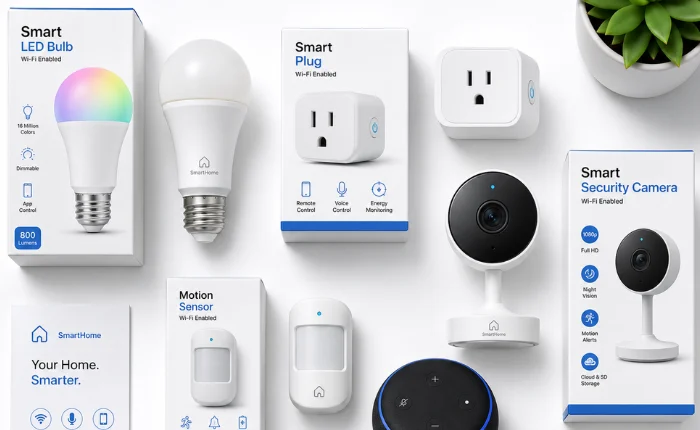
The Kasa smart plug is the workhorse of affordable home automation. Plug it in, and suddenly any “dumb” appliance becomes smart.
What it does: Turn devices on/off from your phone, set schedules (coffee maker at 6 AM?), monitor real-time energy usage, or trigger automation routines.
Why it wins: TP-Link’s reliability is legendary. The app is intuitive. It integrates with all three major ecosystems. Plus, Kasa plugs are small enough that they don’t block adjacent outlets.
Real-world use: One user automated their living room fan to turn on at 7 PM every day. Another uses one to prevent vampire power drain on their entertainment center. A renter I know uses them to add smart lighting without touching any wires.
Best for: Renters, first-timers, anyone wanting to test smart home waters.
2. LIFX Color A19 Smart Bulb – Best Smart Lights
Price: $25–$35 | Connectivity: WiFi (no hub needed) | Integration: Alexa, Google Home, Apple HomeKit
LIFX bulbs don’t need a separate hub. Screw them in, and they connect directly to WiFi. Instant automation.
What it does: Control brightness, color, and color temperature from your phone or voice. Set wake-up routines (gradually brighten at 7 AM). Sync lights to music or time of day.
Why it wins: Setup takes 2 minutes. The light quality is excellent (16 million colors). It’s reliable and fast—no lag between command and response.
Trade-off: LIFX bulbs cost more than Philips Hue alternatives, but they don’t require a hub, making them cheaper overall.
Best for: Anyone replacing existing bulbs, people who want color automation without a hub, bedrooms and living rooms.
3. Amazon Echo Dot (5th Gen) – Best Smart Speaker
Price: $50–$65 | Connectivity: WiFi | Integration: Alexa ecosystem (hub for Zigbee devices)
The Echo Dot is the most affordable entry point to voice control. And honestly? It’s excellent.
What it does: Control all your smart home devices with voice commands (“Alexa, turn on the bedroom light”). Play music, check weather, set timers, read news, control routines.
The hidden benefit: The Echo Dot doubles as a Zigbee hub for Alexa smart home devices. This means you can buy cheaper Zigbee gadgets (smart bulbs, switches, sensors) and control them through Alexa.
Why it wins: Affordable. Sound quality is surprisingly decent. Alexa integrates with thousands of devices. The Zigbee hub feature is huge for budget builders.
Best for: Alexa ecosystem users, anyone wanting voice control, budget-conscious people building a smart home from scratch.
4. Wyze Cam Pan v3 – Best Smart Camera
Price: $35–$45 | Connectivity: WiFi | Integration: Alexa, Google Home
Affordable smart cameras often have poor quality or creepy privacy issues. Wyze breaks that stereotype.
What it does: 1080p video, pan/tilt, night vision, motion detection, two-way audio, cloud/local storage options.
Why it wins: No subscription required for basic features. You get cloud clips free. Privacy options are transparent. The camera is small and unobtrusive. Pan/tilt is smooth (helpful for monitoring a room).
Real-world perspective: A mother uses it to check on kids while working. A homeowner uses it for package detection. A small business owner uses it for after-hours monitoring. All without paying monthly fees.
Best for: Home security on a budget, pet monitoring, garage/porch surveillance, anyone concerned about privacy.
5. TP-Link Tapo Smart Bulb (L530) – Best Budget Lighting
Price: $12–$18 | Connectivity: WiFi (no hub needed) | Integration: Alexa, Google Home
If LIFX is premium, Tapo is the value player. These bulbs work great and cost less.
What it does: Color and brightness control, scheduling, voice commands, automation routines. No hub required.
Why it wins: Cheap. Reliable. Good light quality. Fast response. TP-Link’s ecosystem is cohesive (plugs and bulbs work perfectly together).
Best for: Budget builders, people replacing multiple bulbs, renters experimenting with automation.
6. Wyze Thermostat – Best Smart Climate Control
Price: $50–$65 | Connectivity: WiFi | Integration: Alexa, Google Home
A smart thermostat usually costs $150+. Wyze’s version is half that and actually works.
What it does: Adjust temperature remotely, schedule heating/cooling, get energy reports, automate based on time or temperature.
Why it wins: No subscription. Easy installation (standard 2–5 wire setup—YouTube can help). Energy reports show you where money’s going. Compatible with most existing HVAC systems.
Best for: Anyone wanting to cut heating/cooling costs, homeowners with basic HVAC setups, people tired of adjusting thermostats manually.
7. Wyze Motion Sensor – Best Automation Trigger
Price: $8–$12 | Connectivity: Zigbee | Integration: Alexa (requires Echo Dot or Echo Show as hub)
Motion sensors are the unsung heroes of home automation. They trigger routines without you doing anything.
What it does: Detect motion, send alerts, trigger automations (turn on lights when motion detected, send notification if motion detected at night, turn off lights when no motion for 5 minutes).
Why it wins: Dirt cheap. Battery lasts months. Tiny and easy to hide. Works with Alexa routines beautifully.
Best for: Creating automation “magic” (lights turn on when you enter), security monitoring, energy saving (auto-off lights), people building Alexa-based smart homes.
8. Meross Smart Switch (Smart Light Switch) – Best Wall Control
Price: $30–$40 | Connectivity: WiFi | Integration: Alexa, Google Home, Apple HomeKit
Smart plugs are convenient, but sometimes you want to replace the actual light switch.
What it does: Control lights from the wall switch (physical button), from your phone, or with voice. Set schedules. Create automations.
Why it wins: Meross switches are reliable and compact. Installation is straightforward if you’re comfortable with basic electrical work (or hire an electrician—still cheaper than expensive alternatives). No separate app needed; integrates seamlessly with your phone.
Best for: Homeowners, people wanting built-in smart control, anyone tired of power cords or smart plugs in outlets.
How to Choose Affordable Home Automation (Without Regret)
Buying gadgets is one thing. Building a system that actually works together is another. Here’s how to avoid common mistakes.
Compatibility First: Pick Your Ecosystem
The biggest mistake people make: buying gadgets from different ecosystems.
You have three main choices:
Amazon Alexa – Most affordable, most gadgets available, most integrations. Start here if you’re unsure.
- Hub: Echo Dot ($50) or Echo Show ($60)
- Best for: Budget builders, people who want choice
Google Home – Excellent integration with Google services, clean interface, fewer gadgets available (but improving).
- Hub: Google Home Mini ($50) or Nest Audio ($100)
- Best for: Gmail/Google Calendar users, seamless smart home management
Apple HomeKit – Most private, best security, fewest gadgets, most expensive ecosystem.
- Hub: HomePod mini ($100)
- Best for: Apple users, privacy-focused people, people willing to pay more
Pro tip: Most affordable gadgets work with multiple ecosystems. A TP-Link plug works with Alexa, Google, and HomeKit. LIFX bulbs do too.
The key: Don’t mix hubs. Pick one ecosystem and buy gadgets that work with it. Mixing Alexa and Google devices creates confusion and missing features.
Start with a Hub vs. Hubless Devices
Hubless devices (LIFX bulbs, TP-Link plugs, Tapo bulbs) connect directly to WiFi. No hub needed. Perfect for testing and small setups.
Hub-based devices (Zigbee smart bulbs, motion sensors, door sensors) need a hub to communicate. But they’re cheaper per unit and use less WiFi bandwidth. Better for larger setups.
Smart move: Start hubless for 2–3 gadgets. If you like it, get a hub (Echo Dot, $50) and expand with cheaper Zigbee devices.
Subscription Traps to Avoid
Before buying, ask:
- Does basic operation require a subscription? (Bad: yes. Good: no.)
- Is cloud storage free? (Good: at least basic clips are free.)
- Can you control the device offline? (Good: yes. Bad: app-only control.)
Example of good: Wyze cameras record to cloud for free. You get 14-day clip storage without paying.
Example of bad: Some smart lock brands require $10/month subscriptions to unlock remotely (vs. Wyze’s free option).
Affordable Home Automation Starter Bundles ($200–$300)
Don’t know where to start? Here are three complete starter systems:
The Alexa Ecosystem Starter ($280)
- 1x Echo Dot (5th Gen): $50
- 2x TP-Link Kasa Smart Plugs: $35
- 2x TP-Link Tapo Smart Bulbs: $30
- 1x Wyze Motion Sensor: $10
- 1x Wyze Cam Pan v3: $40
- 2x TP-Link Tapo Contact Sensors (door/window): $25 each ($50)
Total: ~$245
What you get: Voice control, lighting automation, appliance control, motion-triggered routines, camera monitoring, door/window alerts.
Why it works: Everything integrates perfectly. The Echo Dot acts as a hub for Zigbee sensors. TP-Link and Wyze devices are legendary for compatibility.
The Google Home Starter ($280)
- 1x Google Home Mini: $50
- 2x TP-Link Kasa Smart Plugs: $35
- 2x LIFX Color Bulbs: $60
- 1x Wyze Cam Pan v3: $40
- 1x Wyze Motion Sensor: $10
- 1x Meross Smart Switch: $35
- Additional smart lights/plugs: $50
Total: ~$280
What you get: Voice control with Google Assistant, full lighting control, appliance automation, camera, motion detection, physical switch control.
Why it works: TP-Link and LIFX work flawlessly with Google. Setup is clean and simple. No learning curve if you already use Google services.
The Platform-Agnostic Starter ($250)
- 3x TP-Link Kasa Smart Plugs: $50
- 3x TP-Link Tapo Smart Bulbs: $45
- 1x Google Home Mini: $50
- 1x Echo Dot: $50
- 1x Wyze Cam Pan v3: $40
- 1x Wyze Motion Sensor: $10
Total: ~$245
What you get: Maximum flexibility. Works with both Alexa and Google. Perfect for households with mixed preferences.
Why it works: TP-Link is the most compatible brand. Both hubs give you access to thousands of integrations. You’re not locked into one ecosystem.
Common Mistakes Buying Cheap Smart Home Gadgets
Mistake #1: Buying Gadgets Without a Plan
You see a $15 smart plug. Looks cool. Buy it.
Then it sits in a drawer because you haven’t actually thought about what you’d automate.
Fix: Before buying, list three problems you want to solve. (“I want lights to turn on when I come home.” “I want the coffee maker to start at 6 AM.” “I want to monitor my garage.”) Then buy gadgets that solve those problems.
Mistake #2: Mixing Ecosystems
You buy an Amazon Echo. Then a Google Home device. Then Apple HomeKit bulbs.
Now your devices don’t talk to each other. Automations fail. Voice commands don’t work across devices.
Fix: Pick one ecosystem first. Buy all gadgets compatible with it. If you want to expand, do it slowly and make sure new devices support your original ecosystem.
Mistake #3: Ignoring WiFi Quality
Cheap gadgets rely on WiFi. If your WiFi is weak, they’ll disconnect randomly.
Fix: Before buying, test your WiFi coverage in the rooms where you want devices. If it’s weak, upgrade your router ($50–$100) before buying gadgets.
Mistake #4: Not Reading Reviews About Reliability
A gadget might be cheap but unreliable. You find out only after buying.
Fix: Read recent reviews (2025–2026). Look for patterns about connectivity, app crashes, or build quality issues. If 30% of reviews mention the device disconnecting, skip it.
Mistake #5: Assuming Everything Works Together
It doesn’t. A gadget might say “Alexa compatible,” but that might mean only basic features work through Alexa. Advanced features require the brand’s app.
Fix: Before buying, verify specific integration. Example: “Can I set a routine using both Alexa and the Wyze bulb’s voice control?” If unclear, look for video reviews showing the actual integration.
Mistake #6: Forgetting About Physical Installation
A smart switch sounds great. Then you realize you need to turn off the breaker and rewire your light. Or you’re renting and can’t modify walls.
Fix: Renters should stick to plugs and bulbs. Homeowners should assess installation difficulty before buying.
FAQ
Q1: Is affordable home automation worth it?
Yes, if you solve a real problem. A $20 smart plug that cuts phantom power drain on your entertainment center might save you $100/year on electricity. A $15 motion sensor that turns on lights automatically adds convenience and saves energy. The ROI isn’t dramatic, but it’s real.
Q2: What’s the cheapest way to start home automation?
Buy a single smart plug ($15) and test it. If you like the concept, add a smart bulb ($15–$25) and a smart speaker ($50). Total: ~$80 for a functional smart home. This lets you learn before spending more.
Q3: Can you mix brands in home automation (e.g., Google + Alexa)?
Yes, but with limitations. A TP-Link plug works with both Alexa and Google. But don’t buy gadgets that only work with one ecosystem if you use both. Stick to brands that support multiple platforms (TP-Link, LIFX, Wyze, Tapo).
Q4: Are cheap smart home gadgets reliable?
Cheap gadgets from established brands (TP-Link, Wyze, Amazon) are solid. Cheap gadgets from unknown Chinese brands often have poor reliability. Stick to recognized brands with decent review histories.
Q5: Do affordable home automation gadgets need a hub?
Some do, some don’t. WiFi gadgets (LIFX bulbs, TP-Link plugs) work standalone. Zigbee gadgets (cheap smart bulbs, motion sensors) need a Zigbee hub (Echo Dot, ~$50). Both approaches are affordable—just know which you’re buying.
Q6: What hidden costs come with cheap smart home tech?
Cloud storage (usually free but limited), optional subscriptions for advanced features (optional, not required), electricity for always-on devices (minimal—most smart plugs use <1W), WiFi bandwidth (negligible for most homes). Legitimate option: Some cheap gadgets have terrible build quality and need replacement after a year (which is why brand matters).
Q7: Can renters use affordable home automation gadgets?
Absolutely. Smart plugs, bulbs, and portable cameras need zero installation. Smart switches and door locks require wall modification (usually not renter-friendly, unless landlord approves). Focus on plug-and-play devices, and you’re golden.
Conclusion
Building an affordable smart home in 2026 means choosing compatible gadgets over fancy ones. A $20 TP-Link plug and a $50 Echo Dot do 80% of what a $500 enterprise system does.
The secret isn’t spending more—it’s buying less, but buying right.
Here’s what we covered:
- The 8 best affordable gadgets (under $100 each)
- How to pick an ecosystem and stick with it
- Real starter bundles for different preferences
- Common mistakes and how to avoid them
Your next move: Pick one problem you want to solve. Buy the cheapest gadget that solves it. Once you understand how it works, expand from there. Start small. Build smart. Automate intentionally.